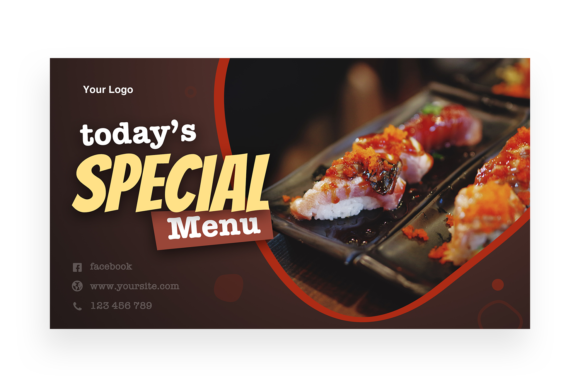
Evaluating the Today's Special Menu Twitter Post Template for Social Media Marketing
In the fast-paced environment of social media marketing, particularly for restaurants and food service businesses, the ability to communicate daily offerings quickly and visually is paramount. The Today's Special Menu - Twitter Post template represents a specific category of digital asset designed to streamline this process. Unlike generic graphic design files that require building a layout from scratch, this resource offers a pre-structured framework optimized for the unique dimensions and engagement patterns of Twitter (now X). Understanding whether this specific template fits your workflow requires a clear evaluation of its technical specifications, ease of use, and how it compares to alternative methods of content creation.
At its core, this product is a layered Photoshop (PSD) file with dimensions of 2400x1350 pixels at 300 DPI. While Twitter displays images at lower resolutions on screens, starting with a high-resolution source file ensures crispness across all devices, including high-density Retina displays and when the image is shared or embedded on other platforms. The inclusion of organized layers and smart object replacement technology distinguishes this template from flat image files or basic Canva-style editors that may limit creative control. For professionals who value precision and brand consistency, these technical features are not just extras; they are fundamental to maintaining a polished online presence.
The Role of Smart Objects in Efficient Workflow
The defining feature of the Today's Special Menu - Twitter Post is its utilization of smart objects. In practical terms, a smart object allows a user to replace the placeholder image within the template without disturbing the existing lighting, shadows, perspective, or filters applied by the original designer. When you double-click the smart object layer, insert your own photo of the daily special, and save, the template automatically wraps your new image into the designated frame with all stylistic effects intact.
This approach contrasts significantly with manual editing methods. Without smart objects, a designer would need to manually mask new images, adjust levels to match the background, and recreate drop shadows or glows every single time a menu item changes. For a restaurant posting daily specials, this manual process is unsustainable. The smart object feature reduces a task that might take fifteen minutes down to less than two. However, it does require the user to have Adobe Photoshop installed and a basic understanding of how to navigate layers. For users entirely unfamiliar with Photoshop, there is a slight learning curve, though the included "Read Me.txt" file typically bridges this gap by providing direct links to the fonts used and brief instructions.
Comparing Template Formats: PSD vs. Online Builders
When evaluating resources for social media graphics, the choice often comes down to dedicated software templates versus browser-based design tools. The Today's Special Menu - Twitter Post falls into the former category. Browser-based tools offer convenience and require no software installation, making them attractive for beginners. However, they often suffer from limitations in file organization, lower output resolution options, and restricted typography controls. Furthermore, many online builders operate on a subscription model where access to premium templates ceases if payments stop.
In contrast, purchasing a standalone PSD file provides a permanent asset. The organized layers mentioned in the product description are crucial here. A well-organized file separates text elements, background textures, overlay effects, and the main image into distinct groups. This structure allows for deep customization. If a brand needs to change the color scheme to match a seasonal promotion or adjust the font weight for better readability, the layered PSD format makes this possible without breaking the design. Online builders often lock these structural elements, forcing users to accept the design exactly as presented or choose from a limited set of predefined variations.
Another consideration is the resolution. The 300 DPI specification of this template indicates it was created with print-quality standards in mind, even though it is intended for digital use. This "over-engineering" is beneficial because it allows the same file to be repurposed. A graphic created for Twitter can easily be resized or cropped for an Instagram story, a Facebook post, or even a digital menu board in the restaurant lobby without losing quality. Lower-resolution templates generated by some free online tools may pixelate when stretched or repurposed for different aspect ratios.
Assessing Limitations and Prerequisites
While the benefits of using a professional PSD template are clear, it is important to acknowledge the tradeoffs. The primary limitation is the dependency on specific software. To edit the Today's Special Menu - Twitter Post, one must have access to Adobe Photoshop. This presents a barrier for individuals or small business owners who rely solely on mobile devices or do not wish to invest in creative cloud subscriptions. Additionally, while the template includes the font links in the text file, the user is responsible for downloading and installing those fonts on their local machine before the text layers will render correctly. Failure to do so results in default system fonts replacing the design typography, which can alter the intended aesthetic.
It is also vital to note what is not included. As stated in the product details, the preview images of food are for demonstration purposes only and are not part of the download. Users must supply their own photography. This is a critical factor in the final quality of the post. Even the best template cannot compensate for poor lighting or low-quality food photography. The template provides the stage, but the user must provide the performance. Businesses without a steady stream of high-quality food imagery may find that the template highlights the deficiency in their content rather than enhancing it. In such cases, investing in a simple light box or learning basic food photography techniques becomes a necessary parallel step to utilizing this design resource.
Ideal Use Cases and Decision Factors
So, when is the Today's Special Menu - Twitter Post the right choice? It is ideally suited for restaurants, cafes, food trucks, and culinary bloggers who post frequent updates and already have a workflow involving Photoshop. It is particularly valuable for establishments that run daily or weekly specials, where speed of publication is essential to drive same-day traffic. The ability to swap an image and update text in minutes allows social media managers to react to inventory changes instantly—for example, promoting a surplus of fresh catch before it sells out.
Conversely, this template may not be the best fit for a business that posts infrequently or lacks the technical capacity to manage PSD files. If a restaurant only posts once a month, the time investment in learning the smart object workflow may not yield a sufficient return compared to using a simpler drag-and-drop tool. Similarly, if the brand identity is still in flux and the logo or color palette changes weekly, a static template might feel restrictive until the visual identity stabilizes.
Decision-makers should also consider the long-term value of asset ownership. By acquiring a well-structured PSD file, you are building a library of reusable components. Over time, the cost per use of a purchased template drops significantly compared to paying monthly fees for design platforms or hiring a designer for every single update. The editable nature of the file means it grows with your brand; you can adapt the "Today's Special" layout to become a "Weekend Brunch" or "Happy Hour" template with minor tweaks, extending its utility beyond the initial purchase intent.
Making an Informed Choice
Ultimately, selecting a design resource like the Today's Special Menu - Twitter Post is about balancing efficiency with creative control. For those who prioritize high-resolution output, precise layer management, and the ability to customize every pixel, this PSD template offers a robust solution that free alternatives often cannot match. The inclusion of smart objects transforms a static design into a dynamic tool capable of handling the rapid pace of social media content cycles.
However, success with this tool relies on the user's readiness to handle the technical requirements, specifically software access and font management, as well as the availability of quality original photography. When these elements align, the template serves as a powerful accelerator for social media strategy, allowing businesses to focus more on their culinary offerings and less on the mechanics of graphic design. By understanding both the capabilities and the constraints of this format, marketers can make a calculated decision that enhances their digital presence without unnecessary friction.